Claude Task Monitor
One corner of the screen, showing which session needs you
Once you’re running five or six Claude Code sessions at once, the problem isn’t that they’re slow — it’s that you don’t know which one to look at. One is working and needs nothing. One asked a question and has been sitting there. One finished three minutes ago and you haven’t noticed.
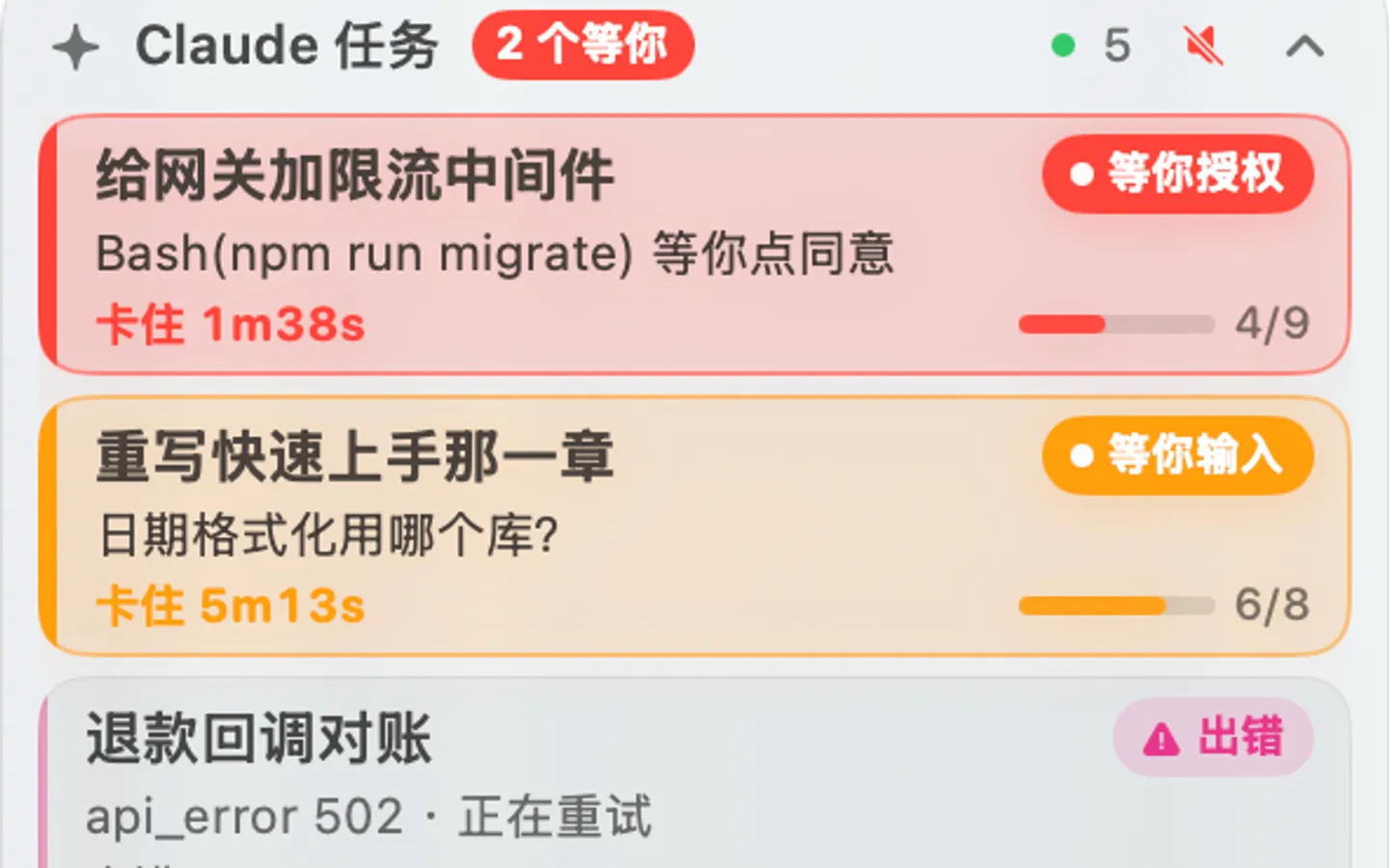
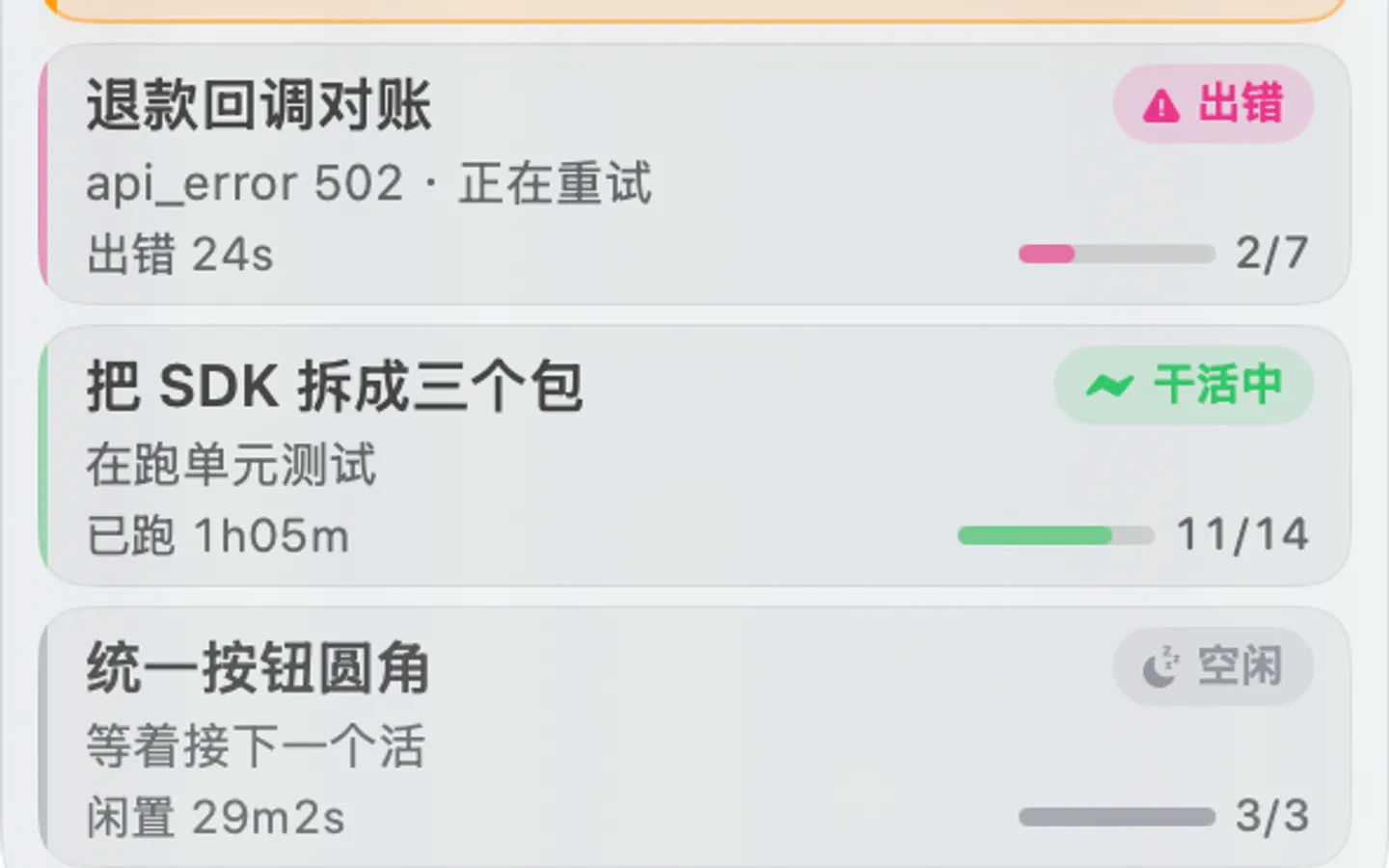
This is a small always-on-top window in the top-right corner of macOS that lays every local session out together: who’s working, who’s waiting on you, how long they’ve been stuck, how far the todos got. It never takes focus and never appears in the Dock or Cmd-Tab. Entirely local — no network, no API key, read-only access to ~/.claude/.
The sort order is the whole argument
Cards are always ordered: waiting for permission → waiting for input → errored → working → idle → exited, and within a tier the one stuck longest floats up. Whatever needs your hands is always at the top. You don’t read the panel so much as glance at colour and position.
Six states, each with its own colour. Permission is red — handle it now. Input is orange. Errors are magenta, deliberately kept away from the permission red so you don’t misread one as the other. Working is green, idle grey, exited dark grey.
Collapsed, it’s 2.5% of the area
Expanded is 296 × 336. Collapsed is 72 × 35 — it contracts horizontally and vertically at once into a small pill in the corner, anchored on its right edge so it only shrinks left and down.
Collapsing doesn’t mean going blind, though: the connection indicator, session count, waiting count and unread count all stay visible. The width is computed from content, widening when there’s an “N waiting” badge and shrinking to nothing when there isn’t.
Unread dots track transitions only
A session that goes from working to idle gets a red dot — meaning “there’s a result here you haven’t looked at”. Clicking the card clears it, and so does the session becoming active again, since that means you’ve picked it up.
The important part is that it only reacts to transitions. On app restart, sessions that finished long ago don’t all get marked unread — that isn’t “just produced a result”. Sounds work the same way: nothing plays at startup, nothing plays for a newly discovered session. Otherwise every restart would be a burst of noise.
Why not system notifications
Tried it; it doesn’t work. macOS’s notification daemon refuses ad-hoc signed, un-notarised local apps — osascript display notification is silently dropped (with exit code 0, no less) and UNUserNotificationCenter returns Notifications are not allowed outright. Real banners require a developer signature and notarisation, which puts a real barrier in front of “clone it and build it yourself”.
So instead: a border flash, a sound, and a card that stays red. Fully local, zero permissions, completely reliable. The window follows all desktops and floats above full-screen apps, so it’s visible from any Space.
How it’s built
SwiftUI and AppKit on an NSPanel, plus a zero-dependency Node status engine. There’s exactly one pipe between processes: the app spawns node engine/index.js --watch and reads NDJSON line by line off stdout. If the engine dies it restarts with exponential backoff capped at 30 seconds, and the child is killed when the app exits.
All the data comes from files Claude Code already writes locally — the session registry, the conversation .jsonl, todo progress. Those .jsonl files get very large (140 MB on this machine), so the engine seeks to the end and reads only the last few dozen KB, skipping unchanged files via an mtime cache. A full scan measures 3–14 ms.
Two things worth writing down. GUI-launched .app bundles inherit a minimal PATH with no /opt/homebrew/bin, so /usr/bin/env node can’t be relied on — you have to probe the usual install locations and fall back to scanning nvm’s version directories. And the engine and app use different state vocabularies (running / waiting_permission versus working / needsAuth); an early version fell back with SessionState(rawValue:) ?? .idle, so every single state failed to match and silently collapsed to idle. The window didn’t error — it just painted every session grey, which is harder to spot than a crash.
Disclaimer
A personal project, unaffiliated with Anthropic. Not an official tool.
- Launched
- 2026
- My role
- Solo developer
- Built with
- SwiftSwiftUIAppKitNode.js