Quadrant
Sort out what actually matters before you start
Most to-do lists answer “what is there to do” and can’t answer “what do I do first”. So the longer the list gets the worse it feels — every line looks equally urgent.
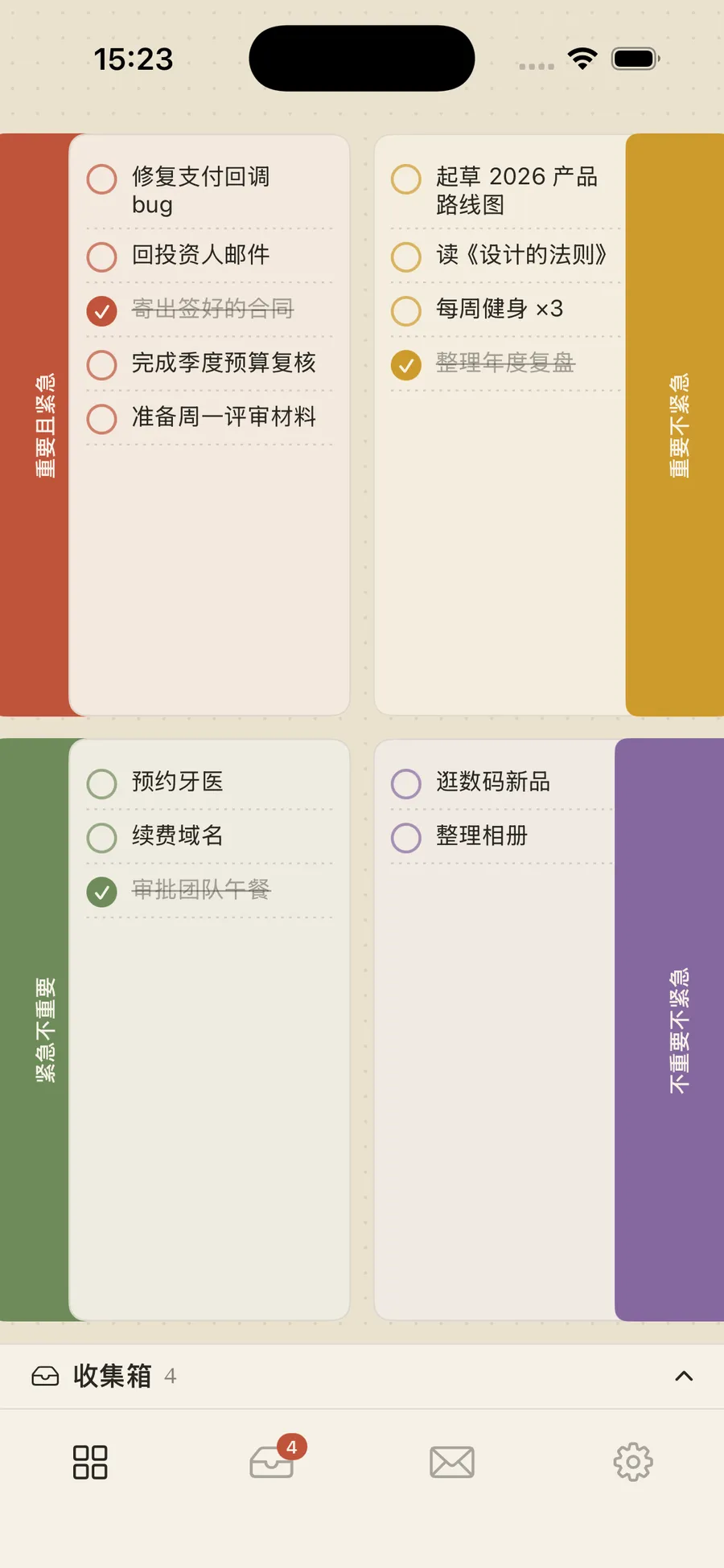
The Eisenhower matrix exists for exactly that: put a task into one of four boxes cut by importance and urgency, and what to do next surfaces on its own. This app makes the matrix the main interface itself, not a view buried in settings.
One app across iPhone, iPad and Mac.
An inbox, so capture comes before sorting
Sorting has a cost. If every passing thought has to be judged important-or-not and urgent-or-not on the spot, that friction is enough to make you not write it down at all.
So there’s an inbox: jot it down first, leave quadrant empty, decide later. When you have a moment, drag entries into the matrix — or tap the arrow on the right of a row to file it in one move. A permanent inbox tray sits at the bottom of the main screen with the unsorted count always visible, so it can’t quietly become a black hole.
History keeps the day’s shape
Completed tasks aren’t deleted. They move into History, archived by date and still grouped by quadrant within each day.
That grouping is deliberate. Looking back, what you want isn’t “five things done today” — it’s “four of today’s five were urgent-but-not-important”, which tells you the day was driven by other people’s schedules. The grouping preserves that; a flat list erases it.
A risograph planner look
The visual language isn’t the usual iOS grey-and-white cards but a printed one: dot-grid paper as the desk, four risograph inks (brick #C0543B, mustard #CE9A2C, sage #6E8B5B, plum #86689F), serif quadrant names, hand-drawn circular checkboxes, and coloured divider tabs as the signature element.
That choice follows from what the matrix is — a paper tool. It was born in a notebook, not in software. An interface that looks like a planner page sits closer to where it came from than one that looks like a database.
How it’s built
SwiftUI with SUPPORTS_MACCATALYST = YES — the Mac build goes through Catalyst rather than a separate macOS target, so one codebase covers three platforms. iOS 18.6 minimum, 127 supported devices.
Storage is a single local JSON file (Documents/tasks.json) written straight through JSONEncoder. No account, no server, no sync — that’s as much complexity as a four-quadrant list needs.
Note
Shipped on the App Store; the current public version is 1.0.0.


- Launched
- 2026
- My role
- Solo developer
- Built with
- SwiftSwiftUIMac Catalyst